Welcome to Scriptz ❤️ Webmaster Forums!

How to Post Resources

Welcome to our community! Before posting or sharing resources, please follow our 📖 forum guidelines
to help keep Scriptz a trusted and useful place for webmasters and developers.

⚠ Important:- Please use a valid email address when creating your account. Spam, disposable,
or temporary email IDs are not allowed, and accounts using them may not be approved.


MagicAI Perplexity Integration

UNTOUCHED MagicAI Perplexity Integration v1.1

No permission to download
perplexity.png


Enhance your AI experience with the Perplexity API for real-time data capabilities. Follow these steps to set it up:

1. Get Your API Key

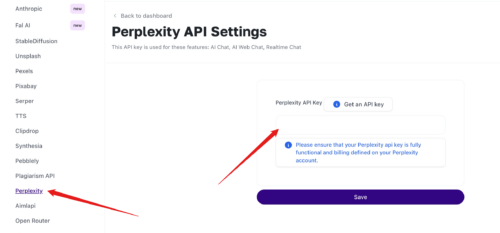
2. Enter API Key in MagicAI

  • Go to API Integration > Perplexity on your MagicAI dashboard.
  • Enter and save your API Key.
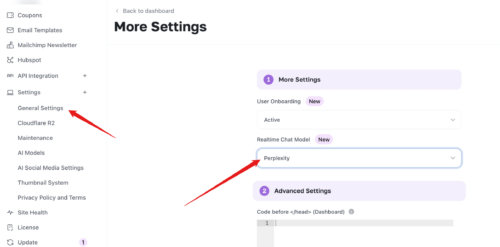
3. Select Perplexity as Your Chat Model

  • In General Settings, click More (advanced settings).
  • Under Realtime Chat Model, select Perplexity.
4. Start Using Perplexity

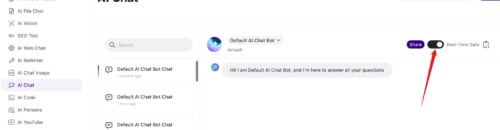
  • AI Chat: Enable the Realtime Data option to activate Perplexity.
  • AI Web Chat: Perplexity is enabled by default.
Enjoy real-time, data-rich AI interactions with MagicAI and Perplexity!
Author
johnwick
Downloads
0
Views
49
First release
Last update

Ratings

0.00 star(s) 0 ratings
Tags Tags
None
Back
Top